
Key points
- Every accounting system records the same things: a chart of accounts, journal entries, customers, suppliers, stock and bank. Learn those concepts and you can move between systems.
- Odoo can be practised at no cost: its pricing page offers one app free, with unlimited users, for as long as you use it. Note that full Accounting is in the Enterprise edition; Community has Invoicing.
- Odoo has an Egyptian localisation and an ETA e-invoicing module, so you can practise the same setup an Egyptian company uses.
- SAP sells SAP Business One for small businesses and has a free SAP Learning account. Learn it when the job ads you want ask for it.
- Local programmes are learned quickly on the job. Do not spend months on one before you know where you will work.
Learn Excel and the accounting cycle first, then one accounting system in depth. For most fresh graduates in Egypt that system can be Odoo, because you can practise it at no cost with an Egyptian setup. Learn SAP when the employers you are aiming at ask for it, and pick up a local programme on the job. Employers rarely test which buttons you know; they test whether you can post entries correctly, reconcile a bank and close a month in whatever system they use.
What do all accounting systems have in common?
They all record the same things in a different layout: a chart of accounts, journal entries, customer and supplier records, items and stock movements, bank accounts and the reports built from them. An accountant who understands why a supplier invoice credits the supplier and debits stock or expense can find that screen in any system in a day. One who has memorised menus without the logic has to start again with every new employer.
That is why Excel comes before any system. Most month-end work still passes through a spreadsheet: exporting a ledger, matching it to a bank statement, building a schedule for the auditor. Lookups, pivot tables and a clean reconciliation layout are used in every job, whichever software the company runs.
Why is Odoo a good first system to learn?
Because you can practise on it properly without paying. Odoo’s pricing page offers a One App Free plan: one app, unlimited users, hosted online, and Odoo says its use stays free whatever other apps that one depends on. You can open a database, choose the accounting app, and run a small company’s month through it.
Know which edition you are looking at. Odoo comes as Community, which is open source, and Enterprise, which is licensed. On Odoo’s own comparison page, the full Accounting app, with bank reconciliation, analytic accounting, budgets and reports, is marked as Enterprise only; Community has Invoicing. If a course or a company uses Community, expect the accounting side to be thinner or extended with extra modules.
Odoo also has an Egyptian setup. Its documentation lists an Egypt accounting localisation and an Egyptian e-invoice integration with the Egyptian Tax Authority (ETA), available from Odoo 15. To connect, the company registers its ERP on the ETA portal to receive API credentials, and products are matched to GS1 or EGS codes. Reading that page teaches you what any system needs before it can issue an Egyptian e-invoice.
When is SAP worth learning?
When the jobs you want ask for it. SAP sells more than one ERP: SAP Business One, which it describes as ERP for small businesses, and SAP S/4HANA, which also appears among the courses on its learning site. SAP Learning lets you create a free account and follow learning journeys, and it offers certification exams. Before paying for a course, read 20 job ads for the roles and companies you want and count how many mention SAP. That count is a better guide than any general claim about the market.
If you do learn SAP, learn the finance module as an accountant, not as a list of transaction codes. The same questions apply: how is the chart of accounts set up, how does a purchase order become a supplier invoice and a payment, and how is the month closed.
What about local accounting programmes?
You will probably meet accounting programmes developed in Egypt or the region, with Arabic screens and local support. They are usually quick to learn on the job, because they cover the same cycle with fewer options. There is little point paying for a course in one before you know your employer uses it. If you join a company that runs one, ask in your first week for the chart of accounts, the list of document types, and last month’s trial balance, and learn the system through them.
| Item | Odoo | SAP | Local programme |
|---|---|---|---|
| Practise without paying | Yes: One App Free plan, hosted online | A free SAP Learning account for courses | Usually only through an employer or a demo |
| Egyptian setup | Egypt localisation and ETA e-invoicing module in the documentation | Check with SAP or its partner | Usually built for the local market |
| When to learn it | As your first system, after Excel | When the job ads you want ask for it | When you join a company that uses it |
What does an eight-week practice plan look like?
Use one invented company, such as a small trading business that buys and sells ten items, and carry it through every step so each week builds on the last.
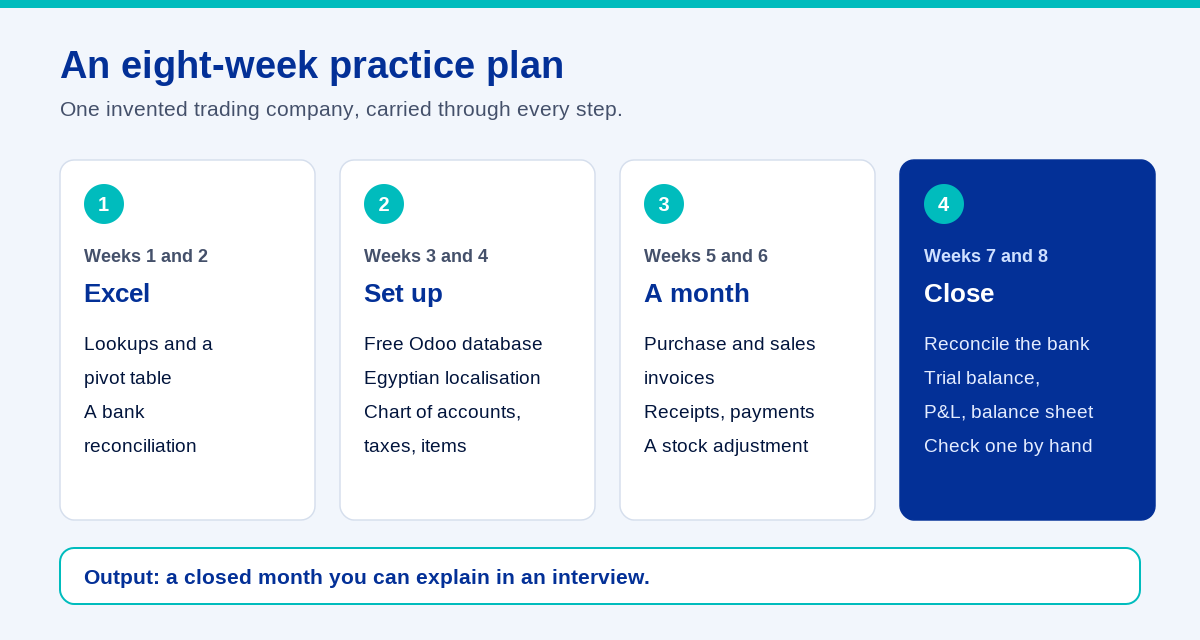
- Weeks 1 and 2: Excel. Build a bank reconciliation from a sample statement, using lookups and a pivot table.
- Weeks 3 and 4: open a free Odoo database with the accounting app, choose the Egyptian localisation, and set up the company: chart of accounts, taxes, ten items, five customers and five suppliers.
- Weeks 5 and 6: record a month of business: purchase invoices, sales invoices, receipts and payments, and one stock adjustment.
- Weeks 7 and 8: reconcile the bank, close the month, and read the trial balance, profit and loss and balance sheet. Then export the ledger to Excel and check one balance by hand.
- Write one page describing what you did. It is the best answer to “what systems do you know?” in an interview.
Common questions
- Is an Odoo or SAP certificate worth paying for as a graduate?
- Only once you know the system is used by the employers you want. A closed practice month that you can explain is cheaper and shows more of what an accounting employer needs to see.
- Does Odoo have an Arabic interface?
- The pages we read did not say, so check the language settings in your own free database. Learning the English terms is useful anyway, because many companies and job ads use them.
- Should I learn programming to work with ERP systems?
- Not for an accounting role. Implementation and customisation are separate jobs. An accountant who understands configuration, such as the chart of accounts, taxes and approval steps, is already valuable on any ERP project.
- My company uses Excel only. Is that a problem?
- Not for your learning, if you use it well. Practise a system on your own time with the plan above, so you are ready when the company, or your next one, moves to an ERP.
Sources
The pages the figures and rules in this article were checked against, read in November 2026.
- odoo.com/page/editions
- odoo.com/pricing
- odoo.com/documentation/18.0/applications/finance/fiscal_localizatio...
- odoo.com/slides
- sap.com/products/erp/business-one.html
- learning.sap.com