
Key points
- SUMIFS and COUNTIFS do most of the summarising work: totals and counts by account, customer, branch or month.
- For lookups, VLOOKUP needs FALSE as its last argument for an exact match; XLOOKUP matches exactly by default but needs Excel 2021, 2024 or Microsoft 365.
- ROUND changes the stored value, while cell formatting only changes what you see. Totals that are off by one pound usually come from that difference.
- UNIQUE and FILTER also need Excel 2021 or later; the other twelve functions work in older versions too.
- Microsoft’s Arabic help pages write formulas with the English function names, such as SUMIFS, so the names below apply to Arabic users too.
The fifteen Excel functions a new accountant uses most are SUM, SUMIFS, COUNTIFS, IF, IFERROR, VLOOKUP, XLOOKUP, INDEX with MATCH, ROUND, ABS, EOMONTH, TEXT, TRIM, UNIQUE and FILTER. Between them they total a ledger by any condition, pull a balance from another sheet, round correctly, clean data exported from an accounting system, and work out month-end dates. This guide gives each one’s syntax as Microsoft documents it, an accounting use, and the Excel version it needs.
Which Excel functions does a new accountant actually need?
You need functions that total by condition, look values up, handle errors, round, clean text and work with dates. The table lists fifteen, grouped by the job they do. Twelve of them work in any Excel version you are likely to meet at work. XLOOKUP, UNIQUE and FILTER need Excel 2021, Excel 2024 or Microsoft 365, so check which version your employer uses before you build a file around them.
| Function | Typical accounting use | Version |
|---|---|---|
| SUM | Total a column of debits or credits | Any |
| SUMIFS | Total sales by branch, or expenses by account and month | Any |
| COUNTIFS | Count invoices per customer, or unpaid invoices over a date | Any |
| IF | Show “Debit” or “Credit”, or flag a balance over a limit | Any |
| IFERROR | Replace #N/A with a clear message in a lookup | Any |
| VLOOKUP | Bring an account name from the chart of accounts | Any |
| XLOOKUP | The same, in any direction, exact by default | 2021 or later, Microsoft 365 |
| INDEX + MATCH | A lookup that works in older versions and in any direction | Any |
| ROUND | Round VAT or a depreciation charge before it is posted | Any |
| ABS | Compare the size of differences whatever their sign | Any |
| EOMONTH | Find the last day of a period, or a due date | Any |
| TEXT | Build a label such as a report heading with a date | Any |
| TRIM | Remove extra spaces from names exported by the system | Any |
| UNIQUE | List each customer or account once | 2021 or later, Microsoft 365 |
| FILTER | Pull every line for one supplier into a new range | 2021 or later, Microsoft 365 |
How do you total a ledger by account, customer or month?
Use SUMIFS. Its syntax is SUMIFS(sum_range, criteria_range1, criteria1, …): first the column to add, then pairs of a column to test and the condition. Microsoft allows up to 127 pairs. COUNTIFS works the same way without the sum range, and counts the rows that meet every condition. Each range must be the same size as the first one.
One trap catches people who learned SUMIF first. In SUMIF the range to add is the third argument; in SUMIFS it is the first. Microsoft’s own page warns about this. If you copy a SUMIF and add a second condition, rewrite the argument order rather than appending to the end.
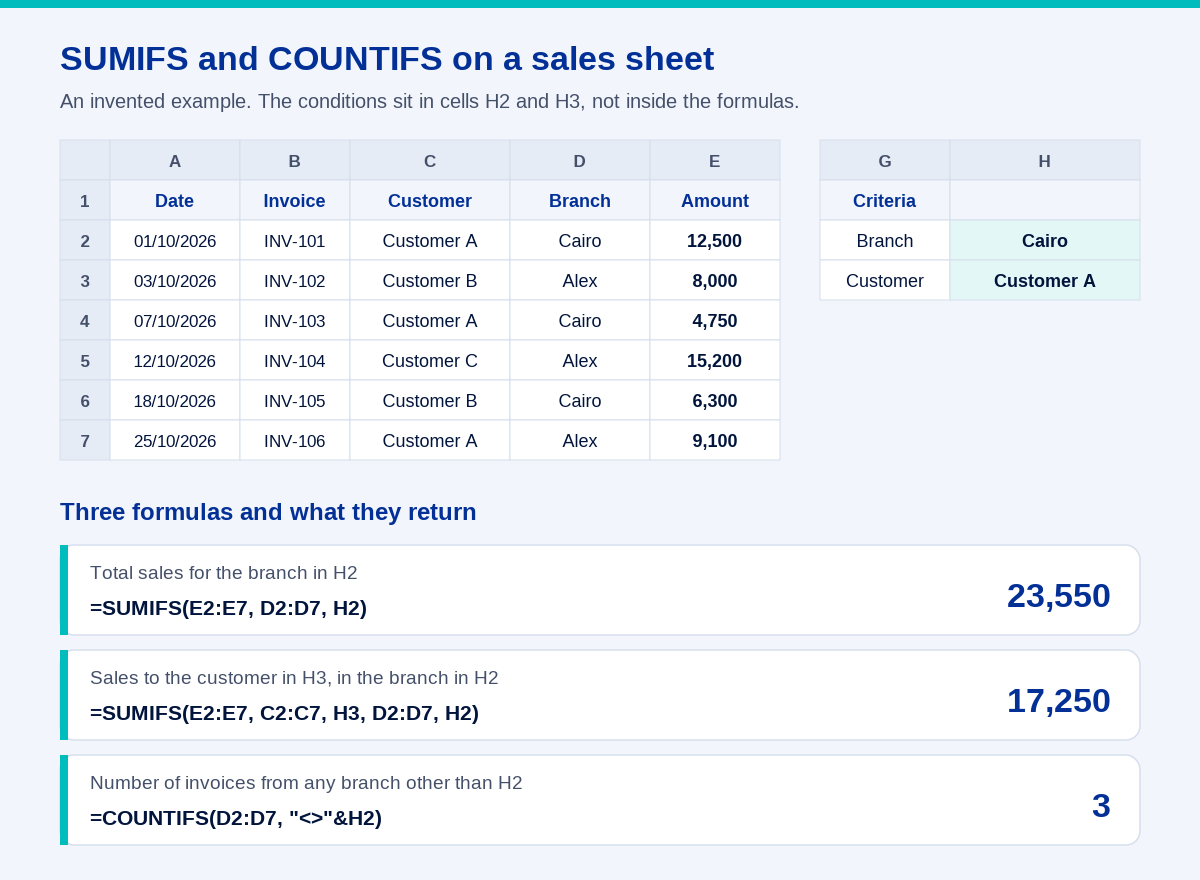
Put the condition in a cell and point the formula at it, as in the figure. A typed condition such as "Cairo" inside the formula works, but it hides the logic, and the person reviewing your file has to open every formula to see what it filters on.
How do you bring a value from another sheet?
Use a lookup function. VLOOKUP(lookup_value, table_array, col_index_num, [range_lookup]) searches the first column of a table and returns a value from a column to its right. If you leave out the last argument, Excel assumes TRUE, an approximate match on a sorted column. For account codes and invoice numbers you almost always want FALSE, an exact match.
XLOOKUP(lookup_value, lookup_array, return_array, [if_not_found], [match_mode], [search_mode]) fixes both weaknesses. It matches exactly unless told otherwise, it can return a column to the left of the one it searches, and its fourth argument sets the text to show when nothing is found. Microsoft’s page notes that it is not available in Excel 2016 or 2019.
If your company still runs an older version, INDEX with MATCH does the same job. MATCH(lookup_value, lookup_array, [match_type]) returns the position of a value, not the value itself, and INDEX returns what sits at that position. As with VLOOKUP, the default match_type is approximate, so write 0 for an exact match.
Be careful with IFERROR. It catches #N/A, #VALUE!, #REF!, #DIV/0!, #NUM!, #NAME? and #NULL!, so wrapping a lookup in it can also hide a broken reference. Show a visible message such as "Not found" instead of a zero or a blank, so a missing account cannot slip into a total unnoticed.
Which functions keep the numbers and text clean?
ROUND, ABS, TRIM and TEXT. ROUND(number, num_digits) rounds the stored value: 2 keeps two decimals, 0 rounds to a whole number, and a negative number rounds to the left of the decimal point. Formatting a cell to two decimals only changes the display, so a column can show figures that look right and add up to a total that is a pound out.
- ROUND: round VAT, depreciation or an allocation at the point you calculate it, so the amount posted is the amount you see.
- ABS: returns a number without its sign. In a bank reconciliation, sort differences by ABS to see the largest ones first, whether the bank or the books are higher.
- TRIM(text): removes every space except single spaces between words. Names exported from a system often carry trailing spaces that make a lookup fail. Microsoft notes that TRIM does not remove the non-breaking space (character 160), which web pages and some exports use.
- TEXT(value, format_text): formats a number as text, for example TEXT(B2,"#,##0.00"). The result is text, so Microsoft advises keeping the original number in its own cell and using TEXT only for labels.
Which function handles month-end dates?
EOMONTH(start_date, months) returns the last day of the month a given number of months before or after a date. A positive number moves forward, a negative one moves back. With an invoice date in A2, EOMONTH(A2,0) gives the last day of that month, which is the period it belongs to, and EOMONTH(A2,1) gives the end of the following month, useful for a “30 days end of month” payment term.
Excel stores dates as serial numbers, so the result may appear as a five-digit number. Format the cell as a date. Combined with SUMIFS, a period-end column lets you total any month without typing the date range into the formula.
What do UNIQUE and FILTER add, and which Excel do they need?
They return a whole list from one formula, which Excel “spills” into the cells below. UNIQUE(array) lists each value once, such as every customer in a sales export. FILTER(array, include, [if_empty]) returns every row that meets a condition, such as all lines for one supplier. Both need Excel 2021, Excel 2024 or Microsoft 365.
Fill in FILTER’s third argument. If nothing matches and it is empty, Excel returns a #CALC! error. Leave room below a spilling formula, too: if a cell in the way already holds something, the formula cannot spill.
Does Excel in Arabic use different function names?
Microsoft’s Arabic help pages write formulas with the English names, for example SUMIFS with English argument names, and its Arabic example formulas use commas between arguments. Microsoft does not publish one rule for every language edition, so if your copy ever shows a translated name, use Insert Function on the Formulas tab to pick the function from the list.
The separator is a separate matter. Excel takes it from the list separator in the Windows regional settings unless you change “Use system separators” under File, Options, Advanced. If Excel rejects a formula you typed with commas, try semicolons, or check that setting. Changing it in Windows also changes the delimiter Excel uses for CSV files.
How should you practise these functions?
Practise on a real export. Take a month of sales or a general ledger export from any accounting system, remove anything confidential, and work through the steps below. Each step uses two or three of the functions above, and the last one checks your work the way a reviewer would.
- Clean the text columns with TRIM, and check that amounts are stored as numbers. Excel marks a number stored as text with an error indicator in the top-left corner of the cell, and its menu offers Convert to Number.
- Add a period column with EOMONTH(date,0).
- Bring the account or customer name in with XLOOKUP, or INDEX with MATCH, and show "Not found" for any code that does not match.
- List the accounts or customers with UNIQUE, then total each one with SUMIFS by period.
- Check that the SUMIFS totals add up to SUM of the whole column. If they do not, some rows did not match any condition, and finding them is the exercise.
Make that last check a habit on every file. Managers and auditors test a summary by tying it back to the source total, and a summary that fails is wrong however tidy it looks.
Common questions
- Should I still learn VLOOKUP if XLOOKUP exists?
- Yes. Many companies run Excel 2016 or 2019, where XLOOKUP is not available, and you will inherit files full of VLOOKUP. Learn both, and INDEX with MATCH as the version-proof option.
- Why does my total differ from the system by one or two pounds?
- Usually because the cells are formatted to two decimals but the values behind them are not rounded. Round with ROUND where the amount is calculated, then compare again.
- Why does my lookup return #N/A when the code is clearly there?
- The two values are not identical. The usual causes are a trailing space, a non-breaking space, or a code stored as text on one side and as a number on the other. Clean with TRIM and check the type before blaming the formula.
- Do I need Microsoft 365 to work as an accountant?
- No. Twelve of the fifteen functions here work in older versions. Microsoft 365 or Excel 2021 adds XLOOKUP, UNIQUE and FILTER, which save time but have older equivalents.
Sources
The pages the figures and rules in this article were checked against, read in November 2026.
- support.microsoft.com/en-us/office/excel-functions-alphabetical-b39...
- support.microsoft.com/en-us/office/xlookup-function-b7fd680e-6d10-4...
- support.microsoft.com/en-us/office/sumifs-function-c9e748f5-7ea7-45...
- support.microsoft.com/en-us/office/countifs-function-dda3dc6e-f74e-...
- support.microsoft.com/en-us/office/vlookup-function-0bbc8083-26fe-4...
- support.microsoft.com/en-us/office/match-function-e8dffd45-c762-47d...
- support.microsoft.com/en-us/office/iferror-function-c526fd07-caeb-4...
- support.microsoft.com/en-us/excel/functions/round-function
- support.microsoft.com/en-us/office/trim-function-410388fa-c5df-49c6...
- support.microsoft.com/en-us/office/eomonth-function-7314ffa1-2bc9-4...
- support.microsoft.com/en-us/office/text-function-20d5ac4d-7b94-49fd...
- support.microsoft.com/en-us/office/filter-function-f4f7cb66-82eb-47...
- support.microsoft.com/en-us/office/unique-function-c5ab87fd-30a3-4c...
- support.microsoft.com/ar-sa/office/sumifs-function-c9e748f5-7ea7-45...
- learn.microsoft.com/en-us/office/troubleshoot/excel/formula-errors
- support.microsoft.com/en-us/excel/convert-numbers-stored-as-text-to...
- support.microsoft.com/en-gb/office/excel-functions-translator-f262d...