
Key points
- The company’s administrator invites users and registers the ERP system; each user acts only within the permissions given.
- A submitted document gets a unique ID and passes nine kinds of validation. It ends as Valid or Invalid, and a valid one can later be Cancelled by the issuer or Rejected by the receiver.
- An issued invoice is never edited. It is cancelled, rejected, or adjusted with a credit or debit note, each within rules and periods the Tax Authority sets.
- Received purchase invoices need the same attention as sales: the buyer has only a limited period to reject a wrong one.
- Reconcile the system with the ledger every month, because the VAT return must be filed with the month’s sales and purchase invoice data.
On the Egyptian e-invoice system the accountant’s work has four parts: keeping the master data right (codes, customers, branches), sending signed documents and watching their status, handling cancellations, rejections and credit or debit notes, and reconciling the system with the books every month before the VAT return. This article walks through each part for an accountant who has just been handed the system. It describes the system as of November 2026 from the Tax Authority’s own guides. It is general information; your company’s obligations, periods and settings are on the Authority’s portal and in its decisions.
Who does what on the system?
Access starts with the company’s administrator, the delegate named at registration. The Tax Authority’s guide gives the administrator the right to invite new representatives, set or block their permissions, and register ERP systems to act for the company. Every other user, including the accountant, works within the permissions the administrator grants.
| Role | What it can do | What to watch |
|---|---|---|
| Administrator (delegate) | Invites users, sets permissions, registers ERP systems, manages contact details and notification channels | Keep the password safe; the regulation limits issuing, reviewing and cancelling to authorised delegates |
| Representative (user) | Issues, views, cancels or rejects documents, as permitted | Give each person only the actions their job needs |
| ERP system | Submits signed documents and receives notifications through the API | Protect the cryptographic keys used for the integration |
What master data has to be right before anything is sent?
Most rejected documents start in the master data. The Executive Regulation requires every e-invoice to carry the code of each item under the unified coding system, the company’s activity code and the code of the issuing branch, the buyer’s type (company, person, foreigner), and the Central Bank exchange rate when the invoice is in a foreign currency.
- Item codes: the system accepts GS1 and EGS codes. A company’s own EGS codes are submitted for approval and cannot be used until approved; the e-receipt guide allows a GS1 category code to be used in the meantime.
- Customers: the buyer’s tax registration number for a registered business, and for an unregistered individual the national ID (or passport number) once the invoice exceeds the value the Authority sets.
- Branches and activities: each branch that issues invoices has its own code, and the activity code must come from the Authority’s list of activity types.
- Units and currencies: the system keeps code tables for units of measure, currencies and tax types. Map your ERP’s values to them once, and check the map whenever a new item or tax treatment appears.
What happens to a document after it is submitted?
The system receives the document, assigns its unique ID and marks it Submitted while it is checked. If every validation passes it becomes Valid; if at least one fails it becomes Invalid. A valid document can later become Cancelled, by the issuer, or Rejected, by the receiver. These are the five statuses in the Authority’s guide.
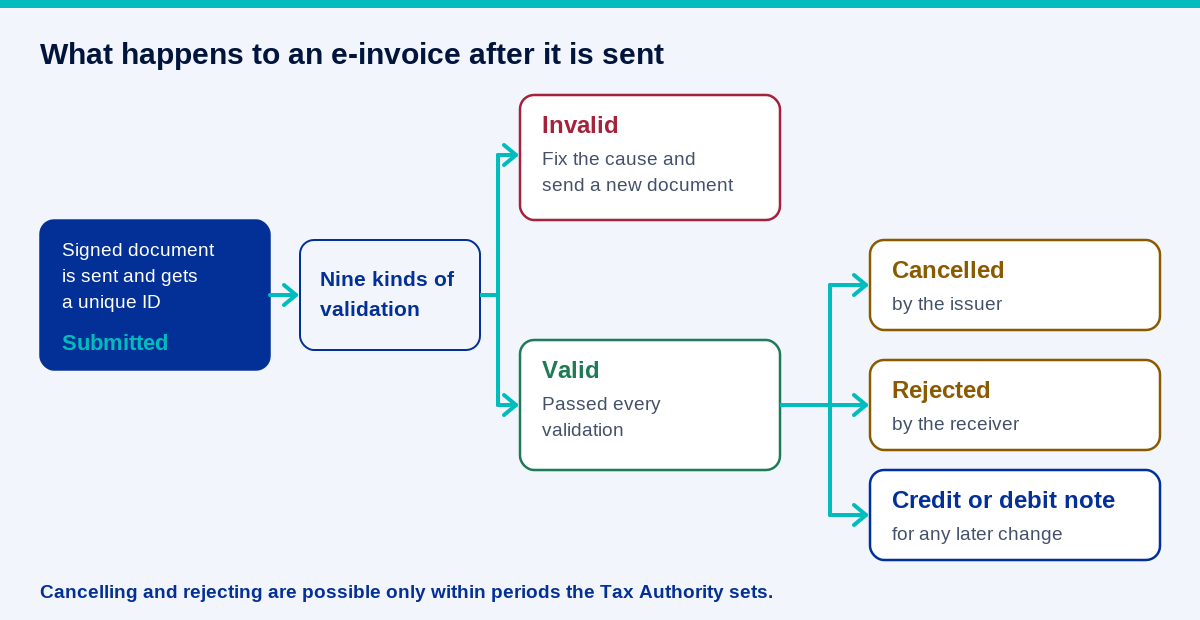
The guide lists nine kinds of validation. Some run at once, while the document is being submitted, and others run afterwards, which is why a document can show Submitted for a while before its final status. The SDK describes the first check as minimal: the structure of the submission, that each document was issued by the submitting taxpayer, and that each document matches its document type version. Full validation follows.
| Validation | What it checks | Where to look when it fails |
|---|---|---|
| Structure | The document matches its document type version (XML or JSON) | The ERP export or integration |
| Mandatory data | All required fields are present | Missing customer or item data |
| Signature | The signature on the document is valid | Expired certificate or token not connected |
| Values and formulas | Percentages and calculated fields add up | Rounding or a tax rate set wrongly on the item |
| National ID | An individual buyer’s national ID, where the value requires it | Customer card for individuals |
| Taxpayer status | The taxpayers named are in good standing on the issue date | An old or wrong registration number |
| Referenced documents | A credit or debit note points to valid invoices | The original invoice was cancelled or rejected |
| Coding | Item, unit and currency codes are real codes | An unapproved EGS code or an unmapped unit |
| Duplicates | The same document was not sent twice | A retry after a timeout |
How do you correct a mistake on an issued invoice?
You do not edit it. The Authority’s guide gives three routes: the issuer cancels the invoice, the receiver rejects it, or the issuer adjusts it with a credit or debit note. Cancelling and rejecting are only possible within periods the Authority sets, and the other side can answer each one. After the periods pass, a note is the only route.
| Action | Who | Typical reasons in the guide | Rules to remember |
|---|---|---|---|
| Cancel | Issuer | All goods returned; wrong buyer registration number; wrong value or data | The buyer may reject the cancellation; if not rejected, it counts as accepted. A document referenced by a note cannot be cancelled until the note is cancelled. |
| Reject | Receiver | Wrong buyer registration number; wrong value; any wrong data | Allowed once per document. The seller may reject the rejection: if the seller does not, the invoice is treated as rejected and a replacement is issued; if the seller does, the invoice stands as valid and final. |
| Credit or debit note | Issuer | Any change after the periods, or a partial return or price change | Must reference valid invoices; the regulation applies the same controls to notes as to invoices. |
The periods for cancelling and rejecting are set by the Tax Authority and can differ by document type; your ERP can read them from the document type settings. Treat every pending request as urgent, because silence counts as acceptance.
What does a monthly routine on the system look like?
Close the month on the system before you close it in the books. The Executive Regulation requires the VAT return to be filed with the data of the month’s sales and purchase invoices, and says an electronic return without that data cannot be relied on. The figures in the return, the system and the ledger therefore have to agree.
- Clear invalid documents. Find the validation that failed, fix the master data or the document, and send a new one.
- Review received documents. Compare each purchase invoice and note with the purchase order and the goods received note, and reject wrong ones while the period is open.
- Act on notifications. Answer every cancellation request from a supplier and every rejection from a customer before its period ends.
- Reconcile. Export the month’s valid documents (the system can prepare a document package for download) and agree sales, notes and purchases to the general ledger and the VAT accounts.
- Hand over. Use the reconciled figures for the VAT return, and keep the reconciliation with the return papers.
The reconciliation usually throws up the same few differences: an invoice entered in the books but never sent, a note sent but booked in the following month, a purchase invoice the supplier cancelled after you booked it, and foreign-currency invoices booked at a different rate from the one on the document. Each needs a decision before the return, and a short note on the working paper saves the question next month.
How should a company train its accountants on the system?
Train on the company’s own data in the test environment that the Authority provides. Have each accountant issue an invoice, cancel it, issue a credit note against a valid invoice, and reject a received document, then reconcile a short test month. The Authority also publishes user guides and explanatory videos. Kayan Finance trains accounting teams on their systems and keeps books, but does not represent clients before the Tax Authority; for registration questions or disputes, go to the Authority or a tax adviser.
Common questions
- Can I issue one invoice that includes both a sale and a return?
- No. The Authority’s answer for receipts is that a return is issued as a credit note, and a single document cannot combine a sale and a return. The same logic applies to invoices: the return goes on a credit note that references the original.
- Why can’t I cancel an invoice that is clearly wrong?
- The usual reasons in the SDK are that the cancellation period has ended, that the document is already rejected or invalid, or that a credit or debit note references it. In the last case, cancel the note first.
- Who signs the invoices?
- The company, with its electronic signature certificate. It can use a hardware token or an e-seal held on a signing server, which belongs to the legal entity. The guide notes a document can carry one or two signatures depending on who sends it.
- Do receipts for consumers follow the same steps?
- They use the same platform and the same code types, but go through the separate e-receipt system from registered points of sale. Our article for owners explains which sales go on which system.
Sources
The pages the figures and rules in this article were checked against, read in November 2026.
- eta.gov.eg/sites/default/files/2023-01/Taxpayers-Introductory-Guide...
- sdk.invoicing.eta.gov.eg/einvoicingapi/02-cancel-document
- sdk.invoicing.eta.gov.eg/einvoicingapi/03-reject-document
- sdk.invoicing.eta.gov.eg/einvoicingapi/01-submit-documents
- sdk.invoicing.eta.gov.eg/einvoicingapi
- sdk.invoicing.eta.gov.eg/codes
- eta.gov.eg/sites/default/files/2023-03/FAQ-V20-12-3-2023.pdf
- eta.gov.eg/sites/default/files/2024-03/law_no.286-2021.pdf
- eta.gov.eg/ar/content/e-invoice-services