
Key points
- The e-invoice covers sales between businesses and the e-receipt covers sales to final consumers. The Tax Authority runs both on the same platform.
- A company is brought into the system by a decision of the Tax Authority, in phases. The Authority’s website has inquiry pages that show whether a company has been obliged.
- Before the first invoice, a company needs an electronic signature certificate, a code for every item it sells, a named administrator, and a way to send: an integrated ERP, the Authority’s portal, or a registered point of sale.
- Each document goes to the Authority when it is issued and gets a unique number. A mistake is fixed by cancelling within the allowed period or by issuing a credit or debit note.
- Small projects that choose the simplified regime under Law 6 of 2025 must still join the e-invoice or e-receipt system when their phase is called.
An e-invoice is a tax invoice that a company issues in a digital format, signs electronically and sends to the Egyptian Tax Authority at the moment it is issued; the Authority checks it and gives it a unique number. The e-receipt applies the same idea to sales to final consumers. For a small company, this means every sale passes through a government system as it happens, so the item list, the customer data and the signature all have to be ready before the first sale is recorded. This article explains the two systems for an owner. It is general information as of November 2026, not advice on any one company’s position, and Kayan Finance does not represent clients before the Tax Authority.
What is the difference between the e-invoice and the e-receipt?
The difference is the customer. The e-invoice is for sales to other businesses, and the e-receipt is for sales to final consumers. The Tax Authority describes the e-receipt system as an extension of the e-invoice system on the same platform. A company that sells to both kinds of customer uses both: business sales on e-invoices, consumer sales on e-receipts.
The Authority’s e-receipt questions-and-answers guide adds three practical points. A company whose sales are all to consumers sends receipts on the e-receipt system only. A printed receipt must carry the receipt’s unique identifier and a QR code, so the customer can look it up. And when a receipt exceeds EGP 150,000, the buyer’s national ID number must be included; the guide, last updated in January 2024, calls this the current limit.
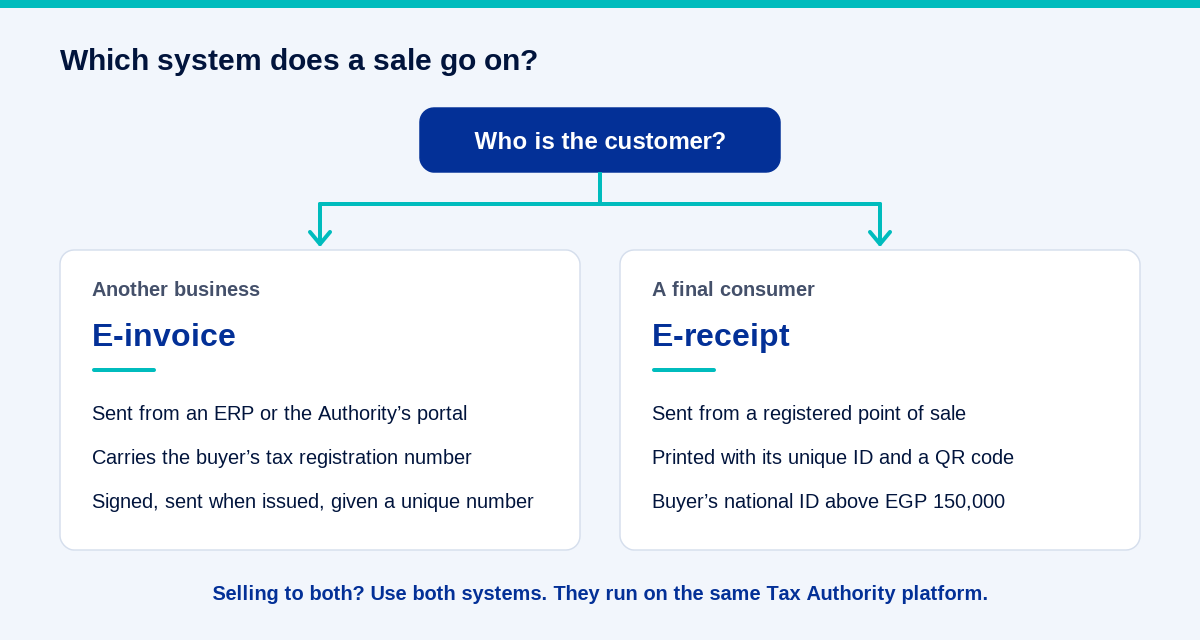
| Item | E-invoice | E-receipt |
|---|---|---|
| Customer | Another business | A final consumer |
| How it is sent | From an ERP system integrated with the Authority, or through the Authority’s portal on request | From a point of sale linked to the system; an accounting system with no tills can be registered as a software point of sale |
| Identifying the buyer | The buyer’s tax registration number; for an unregistered individual, the national ID above a value the Authority sets | The buyer’s national ID when the receipt exceeds EGP 150,000 |
| What the customer receives | The document on the system; an unregistered buyer gets a readable copy and may ask for a printed one | A printed receipt with its unique ID and QR code |
Is my company obliged to join, and from when?
A company becomes obliged by a decision of the Tax Authority, and the decisions come in phases. The Executive Regulation of the Unified Tax Procedures Law (Law 206 of 2020) says the e-invoice system is applied in stages set by the Minister of Finance. The quickest check is the inquiry page on the Authority’s website, which has one for the e-invoice and one for the e-receipt.
The Authority’s list of e-invoice decisions runs from Decision 386 of 2020, which obliged 134 companies in the first phase, to Decision 323 of 2022 for the eighth phase, with one decision in 2022 covering companies registered in Cairo, Giza and Qalyubia. The e-receipt has its own decisions on a separate page. If your company has not received a decision, it can still apply to join the e-receipt system voluntarily; the Authority publishes a form for that. The Authority’s home page also urges taxpayers to register on both systems to avoid legal liability.
A new company should know one rule added in July 2026. Law 150 of 2026 lets the Authority issue a temporary tax card, valid for eight months, while a business completes its incorporation and licensing. That temporary card cannot be used to issue e-invoices or e-receipts.
What does a company need before it can issue its first e-invoice?
The Executive Regulation lists the requirements. The company needs an electronic signature certificate, the unified codes for the goods and services it sells, a service provider or the Tax Authority acting as one, and a named person to administer the system. A company with an ERP system must also complete the integration steps between that system and the e-invoice platform.
- Check whether, and from when, the company is obliged, on the Authority’s inquiry page.
- Obtain an electronic signature certificate from one of the licensed providers the Authority lists. A company can sign with a hardware token or with an e-seal, which belongs to the legal entity rather than to a person.
- Register on the taxpayer portal and name the administrator. The regulation asks for the person’s name, title, national ID, email and phone number; the administrator then adds other users with limited permissions.
- Give every item a code. The system accepts GS1 codes and EGS codes; a company’s own EGS codes must be approved by the Authority before use.
- Decide how documents will be sent: by integrating your ERP through the Authority’s software development kit, through the Authority’s portal, or, for receipts, from registered points of sale.
- Test before going live. The Authority allows an obliged company to start directly in the live environment but recommends trying the test environment first.
- Clean the customer list: every business customer needs its correct tax registration number, because the system checks it.
You do not need an ERP system to issue e-invoices. The Authority publishes a form to request issuing invoices through its portal, and for receipts an accounting system without tills can be registered as a software point of sale.
What changes in the daily work of the business?
Each invoice now has to go through the system at the time of the sale. The regulation requires each invoice to be signed and sent when it is written, in real time, and the Authority then confirms receipt and validity. Your customer sees the invoice on the system too, and can reject it within a period the Authority sets if it was issued wrongly.
- Corrections follow rules. The seller may cancel an invoice within a set period, with the buyer’s agreement; after that, a wrong invoice is corrected with a credit or debit note.
- Sales figures are visible to the Authority as they happen, so the books and the VAT return have to agree with what the system holds. The regulation requires the data of sales and purchase invoices to accompany the electronic VAT return.
- The item list becomes a controlled record. A new product cannot be invoiced until it has a code, so someone has to own the item list.
- Government customers: the regulation forbids electronic payment orders to suppliers who are not registered on the e-invoice system, from a start date the Minister of Finance sets.
What about a small company in the simplified tax regime?
Law 6 of 2025 offers a simplified regime to projects with annual turnover up to EGP 20 million that apply for it. One of its conditions is joining the Authority’s electronic systems, including the e-invoice or the e-receipt, according to the obligation phases the Authority announces, and issuing the required invoices or receipts.
The law also lists data from the e-invoice and e-receipt systems among the ways the Authority determines a project’s turnover. For a shop selling to consumers, the Authority’s e-receipt page says a point-of-sale device can be requested by taxpayers who have joined the simplified regime, through a digital transformation support centre.
Where does the accountant fit in?
Most of the work that makes e-invoicing go smoothly is ordinary bookkeeping done on time: a clean item list with codes, customer records with correct tax numbers, a document cycle in which nobody issues an invoice outside the system, and a monthly check that the invoices on the Tax Authority’s system match the sales in the books. When those are in place, the system is a reporting channel. When they are missing, every rejected or cancelled document becomes a correction in the books.
That is the part Kayan Finance helps with, through bookkeeping and through setting up the documentary cycle. Registration decisions, disputes and anything filed in your name with the Tax Authority are for you or your tax adviser: we do not represent clients before the Authority. For the step-by-step work on the system itself, see our separate article written for accountants.
Common questions
- Do I need an ERP system to issue e-invoices?
- No. The regulation asks for ERP integration only from companies that have an ERP. Others can request to issue invoices through the Authority’s portal using the form it publishes.
- Can my customer refuse an invoice I issued?
- Yes, within a period the Authority sets. After that period, the Authority’s guide says the two sides agree outside the system and the seller issues a credit or debit note.
- What if I sell to an individual for a large amount?
- On an e-receipt above EGP 150,000 you must record the buyer’s national ID. On an e-invoice to an unregistered individual, the regulation requires the national ID (or passport number for a foreigner) above a value the Authority sets.
- Who do I contact with a problem on the system?
- For the e-receipt, the Authority lists the short number 16395 and the email eReceipt.hd@eta.gov.eg. For the e-invoice, its guide page links to a contact page, user guides and explanatory videos.
Sources
The pages the figures and rules in this article were checked against, read in November 2026.
- eta.gov.eg/sites/default/files/2023-03/FAQ-V20-12-3-2023.pdf
- eta.gov.eg/sites/default/files/2024-02/ERECEIPT-FAQ-V24-31-1-2024.pdf
- eta.gov.eg/ar/content/e-receipt-services
- eta.gov.eg/ar/content/e-invoice-services
- eta.gov.eg/ar/content/qrarat-alalzam-bmnzwmt-alfatwrt-alalktrwnyt
- eta.gov.eg/ar/home
- eta.gov.eg/ar/content/altwqy-alalktrwny
- eta.gov.eg/sites/default/files/2023-01/Taxpayers-Introductory-Guide...
- eta.gov.eg/sites/default/files/2024-03/law_no.286-2021.pdf
- eta.gov.eg/sites/default/files/2026-08/law.no_.150.of_.2026.pdf
- eta.gov.eg/sites/default/files/2025-02/law_no.6.of_.2025.pdf
- sdk.invoicing.eta.gov.eg/einvoicingapi/02-cancel-document