
Key points
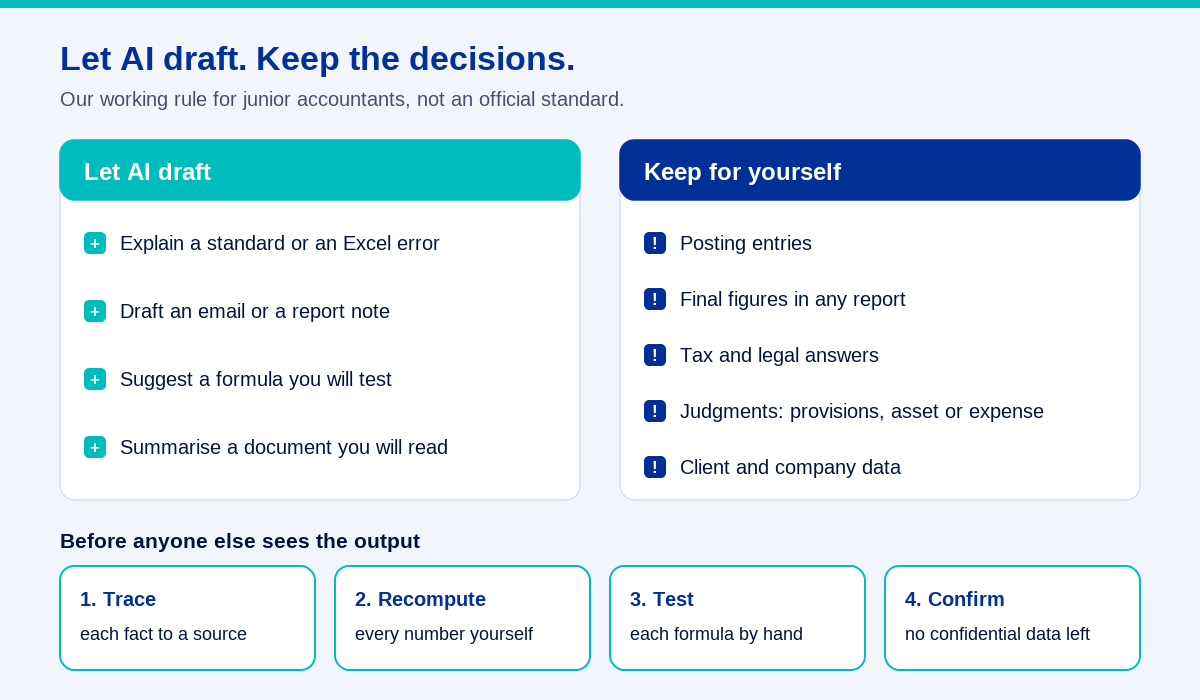
- Useful jobs for AI: explaining a standard or an Excel error, drafting an email or a report note, suggesting a formula, and summarising a long document you then read.
- Do not leave to it: posting entries, the final figure in any report, tax or legal answers, and judgments such as provisions or whether a payment is an asset.
- Microsoft says Copilot in Excel can make mistakes and asks users to verify anything it creates. ICAEW warns that these tools can produce false data with confidence.
- Do not paste client or company data into a public AI tool without permission. Personal ChatGPT accounts share data for model training by default unless the setting is switched off.
AI tools such as ChatGPT, Claude, Gemini and Copilot can save a junior accountant real time on drafting, explaining and building spreadsheets, but they cannot be trusted with a number, a judgment or a legal answer that you have not checked yourself. Their output reads well whether it is right or wrong. Use them as a fast assistant whose work you review line by line, and keep confidential data out of any tool your employer has not approved.
What can AI help a junior accountant with?
It helps most with work where you can easily see whether the result is right: explaining something you will then check, drafting text you will edit, and suggesting a formula you will test. It is weakest where you cannot see the error without redoing the work, such as a total, a tax rate or a summary of a document you have not read.
| Task | How AI can help | What you check |
|---|---|---|
| An Excel formula | Suggests the formula and explains each argument | Test it on rows you can work out by hand, including a blank and an error case |
| An unfamiliar standard or term | Gives a plain first explanation | Read the standard itself, or the regulator’s page, before you rely on it |
| An email to a supplier or a manager | Drafts it in clear English or Arabic | Every name, amount and date, and the tone |
| A note explaining a variance | Turns your bullet points into a paragraph | That it says what you found and nothing you did not |
| A long contract or policy | Summarises it and points to sections | Read the sections that affect the accounts yourself |
| Cleaning an export | Suggests steps or a Power Query approach | Totals before and after cleaning must agree |
What must you never leave to AI?
Anything you would sign, post or send as a fact. The Institute of Chartered Accountants in England and Wales (ICAEW) puts it plainly in its generative AI guide: these tools “do not make up for a lack of professional knowledge and skill”. The responsibility for the work stays with the accountant whose name is on it.
- Posting entries. An AI tool can suggest how a transaction might be recorded; the entry you post must follow your company’s chart of accounts and policies, and you must be able to defend it.
- The final figure in a report. Recompute totals, balances and ratios from the source, in Excel or the accounting system.
- Tax and legal answers. Rates, deadlines and rules change, and a model may not know the latest version. Check the tax authority’s or the regulator’s own publication.
- Judgments: whether a payment is an asset or an expense, how much to provide for a doubtful debt, whether a contract contains a lease. These need the facts of the case and someone accountable for the answer.
- Anything you have not read. Do not forward a summary of a document you have not opened.
Why does AI get accounting answers wrong?
Because these models produce the most plausible-sounding text, and plausible is not the same as correct. ICAEW describes the risk that a model will “hallucinate”, create false data and confidently rely on it, and notes that models can struggle where up-to-date knowledge is critical. The vendors say the same about their own products: Microsoft’s help for Copilot in Excel says it can sometimes make mistakes and tells users to review, edit and verify anything it creates before relying on it.
In accounting the cost of a wrong answer is usually hidden. A formula that ignores one branch, a VAT treatment from another country, or a total that skips a row all look finished. The habit that protects you is the one auditors use: trace the figure back to a source you trust.
How do you check what an AI tool gives you?
Treat it as a draft from a new colleague who writes well and has never seen your company’s books. ICAEW asks accountants to exercise professional scepticism when reviewing AI output. In practice that comes down to four checks, done before the output goes anywhere.
- Trace every fact to a source. A standard to the standard, a rate to the authority’s page, a balance to the ledger. If there is no source, the fact does not go in.
- Recompute every number yourself, in Excel or the accounting system. A total produced by a chatbot is a claim, not a calculation you can rely on.
- Test every formula on cases you can do by hand, including an empty cell, a negative amount and a code that does not exist.
- Confirm that nothing confidential left the company, and say so if you are asked how the work was done.
Can you paste company data into ChatGPT?
Not without your employer’s approval. ICAEW’s guide tells accountants not to load confidential information into public generative AI tools, and warns that data entered may be shared with overseas organisations and used to train models in future. OpenAI’s own help centre says that on personal ChatGPT Free, Plus and Pro accounts, sharing data to improve its models is on by default, and can be switched off under Settings, Data controls, “Improve the model for everyone”. By default, it says, it does not train on content from ChatGPT Business, Enterprise or Edu workspaces.
Switching that setting off does not make a personal account an approved place for client data. If you need help with a real file, replace names, codes and amounts with made-up ones, ask about the structure, then apply the answer to the real data yourself.
What does Copilot in Excel do, and what does it need?
Microsoft says Copilot in Excel can generate formulas, create charts and PivotTables, and give insights on your data. It needs an eligible licence: Microsoft lists a Microsoft 365 Personal or Family plan with AI credits, Microsoft 365 Premium, a commercial Copilot subscription, or an eligible business plan with Copilot Chat. In a company, an administrator usually decides whether you have it. The same checks apply to what it builds: test its formulas and agree its PivotTables to the ledger, exactly as you would your own.
Which skills matter more now that AI is around?
The skills that let you check the machine. You can only catch a wrong entry if you know the right one, a wrong formula if you can build it yourself, and a wrong summary if you know what the standard says. Learn the accounting and the Excel first; the AI tools are faster in the hands of someone who can tell when they are wrong.
Common questions
- Can I use AI to answer an Egyptian tax question?
- Use it to understand the terms, then read the Egyptian Tax Authority’s own publication or the law itself. Do not quote a rate or deadline from a chatbot. We do not represent clients before the tax authority, so for a specific case ask a tax adviser.
- Should I tell my manager I used AI?
- Yes, if it shaped the work. It tells the reviewer where to look harder, and it keeps you within your company’s policy if it has one.
- Will AI replace junior accountants?
- Nobody can say with certainty, and we will not guess. What is clear now is that the tools still need someone who knows the accounting to check them, and that person is worth more to an employer than one who only operates the tool.
- Is there a course on AI for finance staff?
- Several training providers offer one. Our article on CFI certifications covers CFI’s AI programme for finance staff. Whatever course you take, practise on made-up data first.
Sources
The pages the figures and rules in this article were checked against, read in November 2026.
- icaew.com/technical/technology/artificial-intelligence/generative-a...
- icaew.com/technical/technology/artificial-intelligence/generative-a...
- support.microsoft.com/en-us/excel/copilot/frequently-asked-question...
- help.openai.com/en/articles/7730893-data-controls-faq